CT Viewer Story

A real-world, AI-accelerated build from DICOM slices to a full 3D jaw viewer with cross-sectional navigation.

The Story

After a root canal, I asked for the CT scan and received a USB drive filled with DICOM files. The viewer they provided was Windows-only, and I work on a Mac. Rather than spin up a VM, I wrote a single prompt to an AI coding assistant and walked away. Ten minutes later I had a functioning, browser-based CT viewer.

The system evolved through short, natural-language prompts. I asked for a clean local environment, a local web server, and interactive 3D controls. When noise showed up in the reconstruction, I asked for cleanup and the pipeline added smoothing and morphological filtering. When I wanted axial, sagittal, and coronal slices, the viewer gained full MPR views with sliders and window/level controls.

Why it matters: This is the point where “I need this” becomes “I have this” in minutes. It is a real, functional medical imaging viewer built with conversational prompts.
Build Highlights

DICOM to 3D

1,300+ slices reconstructed into a single 3D jaw model with Three.js orbit controls and mesh smoothing.

Cross-Sectional MPR

Axial, sagittal, and coronal views with interactive sliders, plane indicators, and contrast controls.

AI-Driven Iteration

Each feature came from short natural-language prompts: cleanup, UX changes, and view alignment.

Three.js DICOM Marching Cubes MPR Views Window/Level

Viewer Snapshot

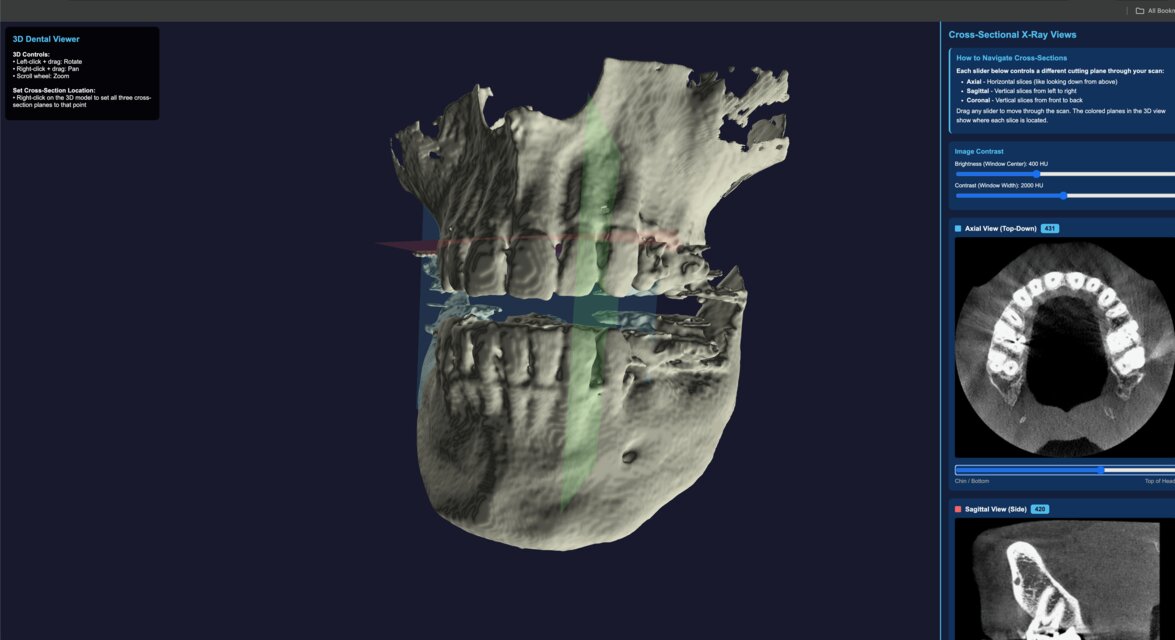
The image below shows the reconstructed jaw with plane indicators and real-time cross-sectional navigation. This is the same interface I used during development to validate alignment and contrast.

CT Viewer interface showing 3D jaw model and cross-sectional panels
3D reconstruction with axial, sagittal, and coronal planes plus contrast controls.

Source Code

The CT Viewer source is available on GitHub. It is published for transparency, experimentation, and educational use.

Medical images are sensitive. Always use this software for educational purposes only.